
// nothing slips off the hook
Pending Apple review · iPhone
Know what you're still on the hook for.
You lent the drill in May. The jacket didn't fit. Somebody still owes you for the concert tickets. None of it is a disaster yet. On the Hook keeps the list, and reminds you before the window shuts.
For shoppers, lenders and anyone waiting to be paid back.
The trouble is rarely forgetting; it's remembering too late. So when something has a date, the app reminds you a week out, two days out and on the day.
- 📦The bag by the doorOrdered two sizes to keep one? Screenshot the order and the app works out when the return window closes.
- 📺The new TVOr the laptop, or the dishwasher. The warranty date and the receipt photo, kept together for the day it breaks.
- 🪜Your ladder, next doorOr the tent, or the book you keep meaning to ask for back. The People screen shows who has what.
- 💸The twenty till FridayThe cab you covered, the deposit you fronted. It tracks who owes you what, and writes the awkward message. You press send.
Add it in a few seconds.
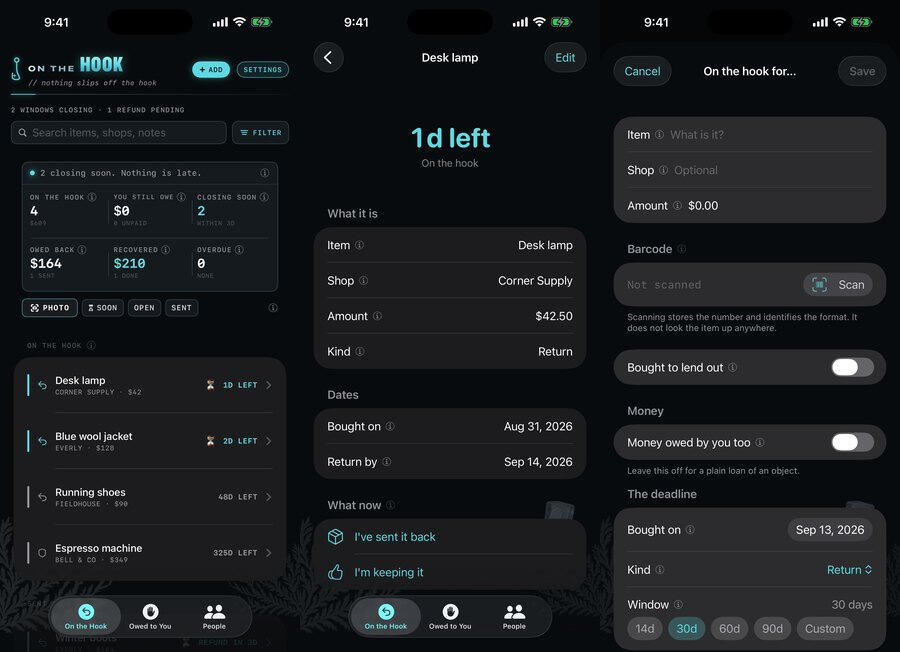
Type it in, photograph the receipt, or take a screenshot of the order you just placed. The app reads it on your iPhone: the shop, the total, the date, and the store's own return-by date when the order shows one.
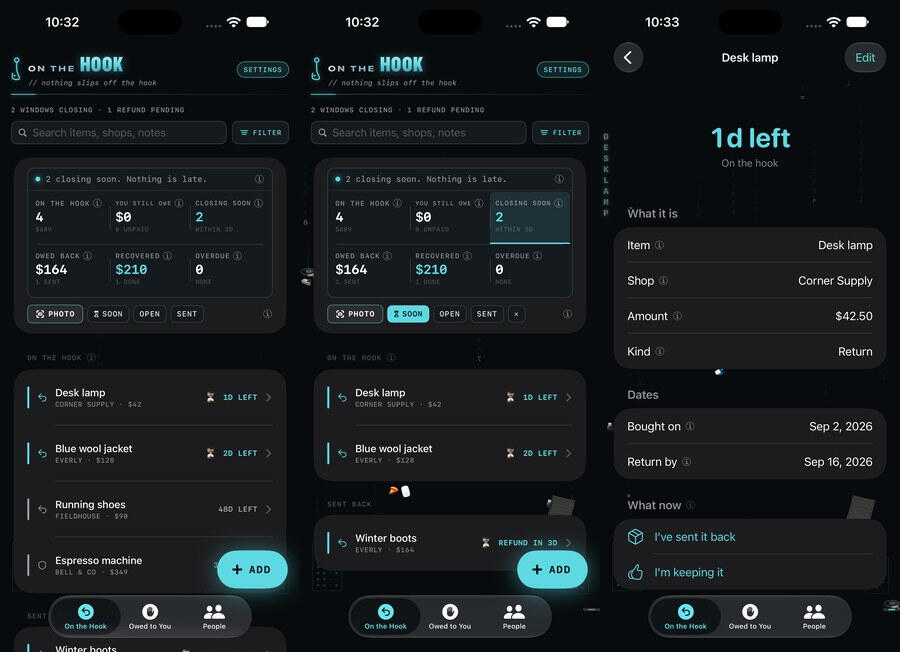
Real screens, from the build the testers have.
What it doesn't do.
- No account, no login, no server. Everything lives on your iPhone and works with no signal.
- Nothing sold, ever. Nothing about you is sold, rented, or handed to a data broker, and a feature only uses the least data it needs to do the job you asked for.
- No analytics and no tracking.
- No subscription.
Suggested return windows show what stores have historically allowed for most items. Stores can change their policies at any time, and most have exceptions. You're responsible for knowing the store's official return policy for your purchase.
On the Hook — Support
Returns, warranties, things you lent out, and money you are owed.
The app explains itself as you use it — every screen has an ⓘ that says what it is for. So this page sticks to what people ask before trusting an app with what they are owed, and to the one thing worth reading twice: how a return window is decided.
Something not working, or something you wish it did? Send us a message. You will get a reply from the person who made the app. The form is at the foot of this page; your name, your email address and your message are emailed to the shop. They are used to answer you. The full account is in the privacy policy.
A note on return policies
The store list shows what each store has historically allowed for most items. Stores can change their policies at any time, and most have exceptions. You're responsible for knowing the store's official return policy for your purchase.
Common questions
- How does it decide when a return window closes?
- From the best source it has, and it says which one under the window. First, a return-by date on your own order, if the screenshot shows one. Then the window you last used at that shop. Then what that store has historically allowed for most items, if it is one of the big stores the app knows. You can change the number every time, and the app remembers what you pick for that shop.
- Does it count from the day I ordered or the day it arrived?
- From delivery when the screenshot shows a delivery date, because most online return windows start then; otherwise from the order date. It tells you which date it used, and you can change it.
- What is a nudge?
- A friendly message about something that is overdue, already written and ready in Messages. Tap “Another way to say it” to change the wording. The app never sends anything by itself; you press send, or you don't.
- I'm not getting reminders.
- Check Settings ▸ Notifications ▸ On the Hook on your iPhone. If notifications are off, the app says so and everything else keeps working. Out of the box, a reminder arrives a week out, two days out and on the day; change the days and the hour in the app's own Settings.
- Can I get my data out?
- Settings ▸ Export & back up writes a folder — a JSON file of every record and your receipt photos, plus a spreadsheet (CSV) if you switch that on — into Files ▸ On My iPhone ▸ On the Hook ▸ Exports. From there you can save a copy to iCloud Drive, share it, or open it in any app that reads JSON or spreadsheets.
- How do I restore a copy, or move to a new iPhone?
- Put the export folder somewhere the new phone can reach — iCloud Drive is easiest — then open Settings ▸ Export & back up ▸ Restore from a copy and pick it. Everything missing comes back; anything already in the app is left alone, and nothing is ever deleted.
- Does the app track me or show ads?
- No analytics, no tracking and no account, and nobody pays to be in this app. What does leave the phone, and when, is listed in the privacy policy.
On the Hook — Privacy Policy
Last updated September 25, 2026
On the Hook has no account and no On the Hook server. What you put in it is kept on your own iPhone, and the app is built to keep working with no network at all. Nothing about you is sold, and nothing you enter is sent to the developer.
The app does reach the internet for two things, both listed below and both plainly visible when they happen: buying a theme pack, which goes to Apple, and looking up what a barcode is, which is on from the start and which one switch turns off. Neither one carries anything about you.
What the app stores, and where
- The things you track — returns, warranties, things you lent out, money you are owed, the people involved, notes, barcodes and any receipt photos — are saved in a database on your own iPhone.
- None of it is uploaded to the developer. There is no On the Hook account and no On the Hook server to upload it to.
- Export writes a folder — a JSON file of every record plus your receipt photos, plus a spreadsheet (CSV) if you switch that on — into Files ▸ On My iPhone ▸ On the Hook ▸ Exports. If you choose “Save a copy to iCloud Drive”, or share the folder, that is your own action through iOS, into your own storage. It never passes through us.
- Deleting the app removes everything it kept on the phone. A copy you saved elsewhere is yours and stays where you put it.
Permissions the app may ask for
- Notifications — for the reminders before a window closes. They are scheduled on your iPhone; there is no push server. Decline and the app says plainly that reminders are off; everything else still works.
- Camera — only when you photograph a receipt or scan a barcode. The words and numbers are read off the picture on your iPhone (Apple's on-device text recognition), and on an iPhone that has Apple Intelligence switched on, Apple's on-device model then sorts that text into the shop, the total, the date and the rest. Both steps happen on your iPhone; the picture and the text are never sent anywhere, and an iPhone without Apple Intelligence just uses the app's own rules instead.
- Photos — only to pick a receipt photo or a screenshot of an order. Apple's picker hands the app the one image you choose, which is read on your iPhone the same way.
- Face ID — only if you turn on Require Face ID in Settings. iOS does the check on your iPhone and tells the app only whether it passed; the app never sees or stores your face data. If Face ID fails, your iPhone's passcode unlocks it instead.
Things the app uses without a permission
- Contacts picker — Apple's picker runs outside the app and returns only the one contact you tap: a name and a number, saved on that row. The app never has access to your address book and does not ask for it.
- Messages — a nudge opens Apple's message composer with the words filled in. You send it or you don't; the app never sends anything by itself, and nothing about the message comes back to the app.
- Siri, Shortcuts and Spotlight — open items can be found in Spotlight and added with Siri. That index is kept by iOS on your iPhone.
Looking up a barcode
On from the start, and one switch turns it off, in Settings, under the scanner. With it off, the app asks nobody anything.
- With it on, scanning a barcode sends the barcode digits and nothing else to one of two free, open catalogs — Open Library for books, Open Food Facts for groceries and household goods — which answer with a name, and sometimes a brand, author or size.
- What is not sent: your name, your list, your photos, your notes, who owes you what, your location, or any identifier for you or your phone. There is no account with either catalog, because neither one has accounts. They are told which app is asking, and no more.
- The answer is offered as a suggestion you tap to use. It is never saved to a record on its own, and you can change every word of it.
- An answer is kept on your iPhone so the same barcode is never sent twice. Forget what has been looked up in Settings clears them.
- If a catalog is slow, down or has never heard of the thing, you get no suggestion and everything else works exactly the same. The app never needs it.
What is never done
Nothing about you is sold, rented, or handed to a data broker — not aggregated, not anonymized, not “with a trusted partner”. There is no analytics SDK, no advertising SDK, and no third-party tracking in this app. The app is not free because you are the product; it is paid for once, and that is the whole arrangement.
The reason the barcode lookup exists is worth saying plainly, because it is the opposite of how this is usually done: it is there to save you typing the name of a thing you already own. It does not feed a profile, it is not how the app makes money, and it is the only thing in here that talks to anybody.
The two rules behind all of this
Everything above is what this version does today, and it can be checked. These two are the standard the next decision gets held to, and they do not change with a release:
- Nothing about you is sold, rented, or handed to a data broker. Not aggregated, not anonymized, not “with a trusted partner”.
- Only the least data a feature needs to work, and only for that feature. If something has to leave your iPhone to do a job you asked for, it is the smallest thing that does the job, it is named on this page, and it is not kept or used for anything else.
That is deliberately a promise about conduct rather than a list of technologies this app swears never to touch. A promise of the second kind is easy to make and easy to break quietly; this one has to be kept every time a feature is added.
How future decisions get made
Everything above describes the app as it is today, and every line of it can be checked. What follows is not a promise about a feature — it is the standard the next decision gets held to.
If this app ever needs a third-party service, or a kind of data it does not take today, that choice gets made for the person using it rather than for the revenue. It might still happen; software changes and so do the things it has to talk to. What will not happen is it being done quietly, or being done because it pays better. Anything of that sort will be described on this page before it ships, and switchable off wherever it can be.
Purchases
On the Hook is paid for once, through the App Store. Theme packs are optional extra purchases, also paid once — they add rooms to decorate the app with, and no feature is ever behind one. There is no subscription. Every purchase is handled by Apple: the developer never sees your payment details, and the app stores only which packs this Apple ID has bought, on the device. Restore purchases in Settings brings them back on a new phone, with no account.
Children
On the Hook is not directed at children and collects no personal information from anyone.
Changes
If this policy ever changes, the updated version will be posted at this address with a new date at the top.
Writing in
Contact is a form on this page rather than an email address. What you type into it — your name, your email address and your message — is emailed to The Butcher Shop by the service that hosts this website, and that service's own privacy policy covers the delivery. The message is used to answer you, and the reply comes from the person who made the app. The app itself has no part in this: it sends nothing when you write in, and nothing you say in the form is joined to your list, your records or anything else in the app.
Contact
Questions about privacy in On the Hook: Send us a message.